Thunderpick delivers mobile betting through browser-optimized platform rather than native apps. Access full sportsbook, casino portfolio, and crypto deposits directly from your smartphone without downloading anything. The mobile site adapts to Android and iOS devices - offering same features as desktop version.
Bet on PSL matches from Joburg traffic, spin slots during lunch breaks in Cape Town, or cash out Aviator wins while waiting for the Metro. Mobile interface reorganizes navigation for smaller screens but maintains complete functionality; you won't miss any markets, games or payment options.
Access Mobile Platform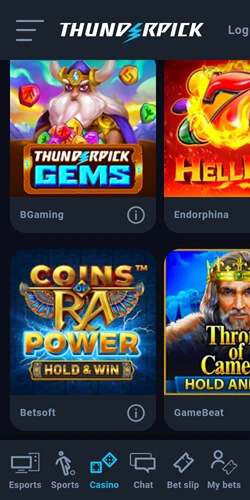
The browser-based platform loads instantly on 4G and 5G networks common across South African cities. No app store restrictions or update delays - simply open your browser and login. This approach avoids the 200MB+ downloads typical of native betting apps, which matters when data costs money.
Mobile layout shifts the side menu to top positioning, letting betting odds or slot reels fill entire screen. One-tap access to live betting markets keeps you in the action. Crypto deposits process just as fast on mobile; Bitcoin transactions confirm in 5-15 minutes regardless of device.
Basically, the platform recognizes your device and adjusts automatically. Portrait mode works for browsing games; landscape orientation suits live sports watching and table games. Touch controls feel natural - swipe between casino categories, tap to place bets, pinch to zoom on betting slips.
Thunderpick chose progressive web technology over downloadable apps. This decision removes app store approval delays and update fragmentation. When new games launch or odds change, mobile users see updates immediately without reinstalling anything.
Google Play and Apple App Store impose strict gambling app restrictions in many regions; browser access bypasses these limitations entirely. South African punters face no geographic blocking or version compatibility issues. Your phone's browser already handles the heavy lifting.
Storage space stays free for photos and music. And security updates apply instantly across all devices - desktop, tablet, smartphone sync through same login credentials.
Works on any modern smartphone browser - Chrome, Safari, Firefox, Samsung Internet. Android 8+ and iOS 12+ fully supported with optimal performance.
Compressed assets and lazy loading minimize data usage. Pages load in under 2 seconds on 4G networks. Cached content speeds up repeat visits.
SSL encryption protects all mobile transactions. Biometric authentication (fingerprint, Face ID) available through browser security features.
Access all 3,000+ casino games on mobile. Slots, live dealer tables, crash games optimized for touch screens. No games restricted to desktop only.
All payment methods work on mobile - crypto wallets, Ozow, Capitec transfers, vouchers. QR code scanning simplifies crypto deposits from phone.
Real-time odds updates and in-play markets. Live streaming available for esports matches. One-tap cash-out during live events.
Open your preferred mobile browser and navigate to the Thunderpick website. The platform detects your device automatically and serves mobile-optimized layout. No special URL or subdomain needed.
First-time visitors should bookmark the site for quick access. On iPhone, tap Share button then "Add to Home Screen" - this creates an icon that launches like an app. Android users tap menu (three dots) and select "Add to Home screen." The result looks and feels similar to native apps.
Login uses same credentials as desktop. Enable "Remember Me" to stay logged in between sessions. Two-factor authentication works identically on mobile through authenticator apps.
Sports betting interface adapts to touchscreens. Tap any match to expand available markets. Swipe horizontally to browse different bet types - 1X2, BTTS, handicaps, totals. Building accumulators requires just tapping multiple selections; bet slip updates in real-time at screen bottom.
Live betting dashboard shows ongoing matches with updating odds. Tap a match to open live view with statistics and streaming (where available). Cash-out buttons appear prominently when that option's available on your bet.
Casino games launch in full-screen mode. Slots auto-adjust bet controls to bottom corners for thumb access. Live dealer games stream in HD; chat functions work through on-screen keyboard. Whereby you're playing Aviator or blackjack, controls stay accessible without zooming.
Try Mobile BettingCryptocurrency deposits shine on mobile. Most South Africans use Luno app for Bitcoin and Ethereum - scanning QR codes from Thunderpick cashier straight into Luno takes seconds. Transaction confirms in 5-20 minutes depending on blockchain congestion.
Ozow instant payments integrate smoothly with mobile banking apps. Select Ozow in cashier, choose your bank, authenticate through banking app, funds appear immediately. Capitec customers enjoy similar direct integration.
OTT Voucher and BluVoucher codes enter manually or scan from physical voucher if your camera's decent. Withdrawals process identically on mobile - request payout, receive crypto to wallet address or bank account within stated timeframes.
Every desktop feature available on mobile - sports betting, casino games, live dealers, bonuses, withdrawals. Zero functionality gaps between platforms.
Desktop shows side menu; mobile moves navigation to top hamburger menu. More vertical scrolling on mobile but all content accessible.
Modern smartphones match desktop speed for most tasks. Complex live betting dashboards may load slightly slower on older devices with weak processors.
Live streaming and animated slots drain battery faster. Screen brightness impacts battery life. Desktop doesn't face power constraints obviously.
Mobile requires stable internet connection. 4G recommended for live streaming and real-time odds. Desktop typically connects via faster WiFi or fiber.
Mobile adds QR code convenience for crypto deposits. Camera-based voucher scanning. Otherwise identical payment methods across devices.
